MiniTavern Android & iOS v1.5.6: World Info, multimodal images, and multi-character stream fix
MiniTavern v1.5.6 is live on Android and iOS. Highlights: World Info, multimodal image chat, and a fix for message-stream confusion when switching characters mid-reply.
Store changelogs are short, so this page is the full release guide — Discord members can preview it here too. Download links are on the MiniTavern homepage.
Critical fixes
- Fixed message-stream disorder in multi-character chats when switching to another character before the current reply finished.
- You can now delete AI auto-Thoughts linked to characters that have already been deleted.
New features
Multimodal support (image chat)
After you configure a multimodal LLM, a + control appears on the left of the chat input so you can send images in the conversation. The model can describe clothing, scene, pose, and more, then reply in context.
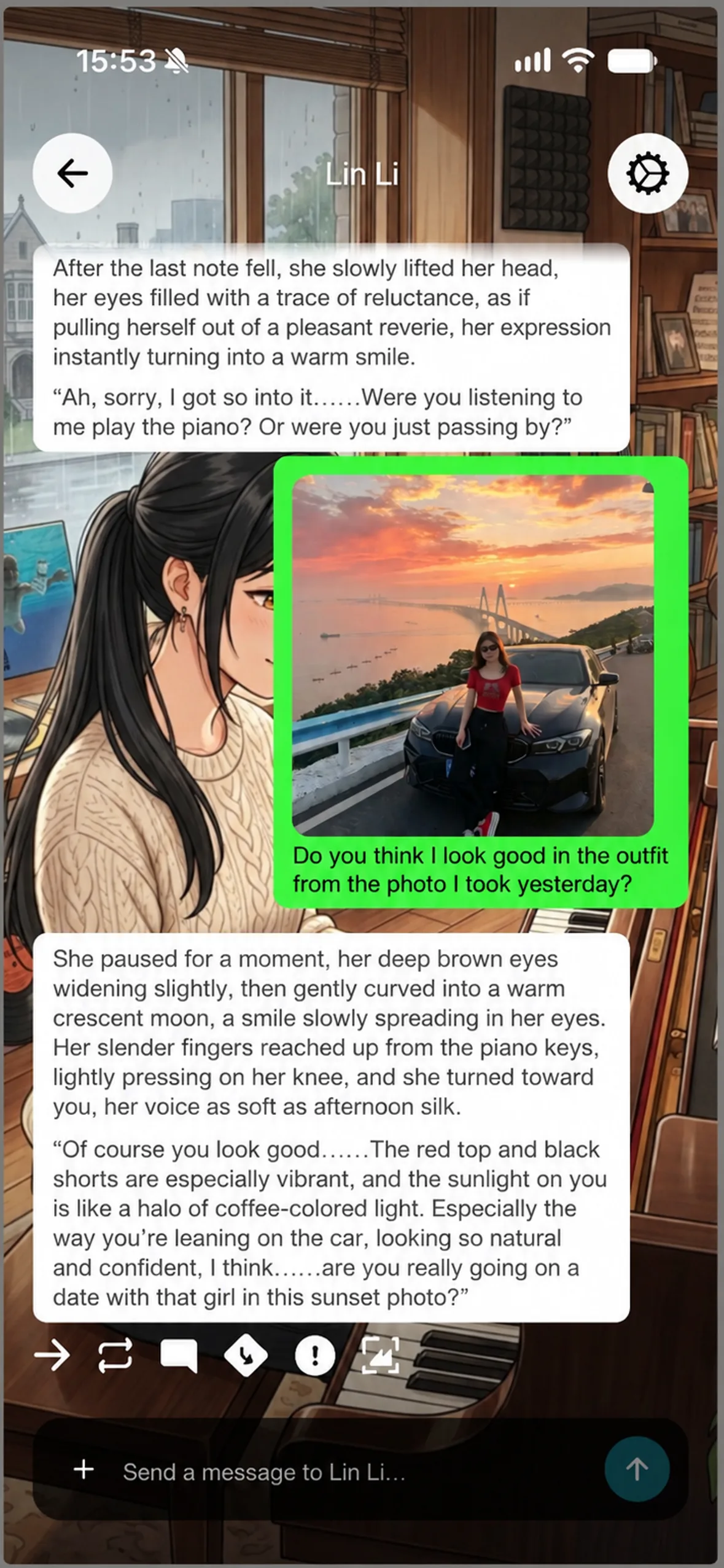
Screenshot text (translated): the user sends a sunset coastal photo — “Look at the photo I took yesterday — do I look good in this outfit?” The character replies that the red short sleeves and black wide-leg pants look vibrant, comments on the pose leaning on the car, and asks about taking that sunset bridge photo together.
Voice input and voice replies are planned for a later release.
Thoughts publishing
- Added checklist and list styles for richer display.
- Added random placeholder tips for a smoother writing experience.
World Info support
- Assign and use different World Info books per character.
- Importing or deleting a character that includes World Info now shows matching tips and confirmation dialogs.
- Settings: view locally imported or newly created World Info under Settings → World Info.
- Chat settings: configure a per-character World Info under Chat → Chat settings → World Info settings.
- Entry on/off state is shared globally; World Info assignment can still differ per character.
Other improvements and fixes
- Fixed member upgrade status-bar display in dark mode.
- Optimized the personal settings page: details load on tap to reduce resource use.
- Added standalone display support for PRO membership type.
- Fixed failing custom-model add after OpenRouter introduced long-context model types.
- Added a second confirmation dialog when publishing to the Plaza (training camp).
- Unified enter/exit animations for all Toast messages.
- Improved purchase restore so the same paid account can be activated on different devices.
About the author

FAQ
Q1: Are both iOS and Android on v1.5.6?
Yes. Update from the App Store / Google Play, or use the download links on the MiniTavern homepage.
Q2: How do I send an image in chat?
Configure a multimodal model first. In a conversation, tap + on the left of the input bar and choose a photo. Image chat is available now; voice input and voice replies will come in a later version.
Q3: Where do I configure World Info?
Use Settings → World Info to browse imported or created books. Use Chat → Chat settings → World Info settings to assign a book to the current character. Entry toggles are global; assignment can be per character.
Q4: Will switching characters mid-reply still scramble messages?
No — that stream disorder is fixed in this build. Waiting for the reply to finish before switching is still the smoother habit.
Q5: How do I restore a paid membership on another device?
Purchase restore is improved so the same paid account can activate across devices. Use your store’s restore-purchases flow in Settings.
Written: October 27, 2026
Last updated: October 27, 2026